
|
크기: 6799
설명:
|
← 2020-12-03 16:07:54에 수정된 3번째 판 ⇥
크기: 7495
설명:
|
| 지워진 줄은 이렇게 표시됩니다. | 추가된 줄은 이렇게 표시됩니다. |
| 줄 35: | 줄 35: |
| {{{#!highlight rout | {{{#!highlight rout numbers=disable |
| 줄 67: | 줄 67: |
| {{{#!highlight rout | {{{#!highlight rout numbers=disable |
| 줄 79: | 줄 79: |
| dataFile <- "https://raw.githubusercontent.com/gehoon/statistics/master/data/grades.csv" grade <- read.csv(url(dataFile)) str(grade) grade$stu.no <- as.character(grade$stu.no) # 학생번호는 숫자지만 텍스트로 인식해달라 grade$class <- factor(grade$class) # 학년은 숫자지만 분류(factor)로 인식해달라 str(grade) |
dataFile <- "https://raw.githubusercontent.com/gehoon/statistics/master/data/spending.csv" df <- read.csv(url(dataFile)) str(df) head(df) plot(df) |
| 줄 88: | 줄 87: |
| Clustering 결과를 눈으로 확인하려면 그래프가 쉬움 * r 기본 그래픽 함수대신 편리한 ggplot2를 사용해보자. * 형식: ggplot(data, aes(x열, y열, color=z열)) + [[https://ggplot2.tidyverse.org/reference/index.html#section-layer-geoms|다양한그림함수()]] |
R 기본 그래픽 함수 대신 편리한 ggplot2를 사용해보자. * 형식: ggplot(data, aes(x=x_data, y=y_data, color=z_data)) + [[https://ggplot2.tidyverse.org/reference/index.html#section-layer-geoms|다양한그림함수()]] |
| 줄 93: | 줄 91: |
| # 설치가 안 되어 있다면 한번만 실행 | # 설치가 안 되어 있다면 다음을 실행하여 설치(최초 1회) |
| 줄 96: | 줄 94: |
ggplot(grade, aes(class, midterm, color=class)) + geom_boxplot() # boxplot ggplot(grade, aes(class, midterm, color=class)) + geom_violin() # violin plot ggplot(grade, aes(class, midterm, color=class)) + geom_violin() + geom_jitter() # geom함수 두개 중첩 ggplot(grade, aes(midterm, attend)) + geom_point() # scatter plot (단색) ggplot(grade, aes(midterm, attend, color=class)) + geom_point(alpha=.7) + xlim(0,100) + ylim(0,11) # grade의 midterm과 attend로 x,y plot을 찍되, 색은 class 별로 다르게 해달라. 투명도는 70% 이고, x,y range는 저렇다. ggplot(grade, aes(midterm, attend, color=hw8)) + geom_point(alpha=.7) + xlim(0,100) + ylim(0,11) ggplot(grade, aes(midterm, hw8, color=attend)) + geom_point(alpha=.7) + xlim(0,100) + ylim(0,20) |
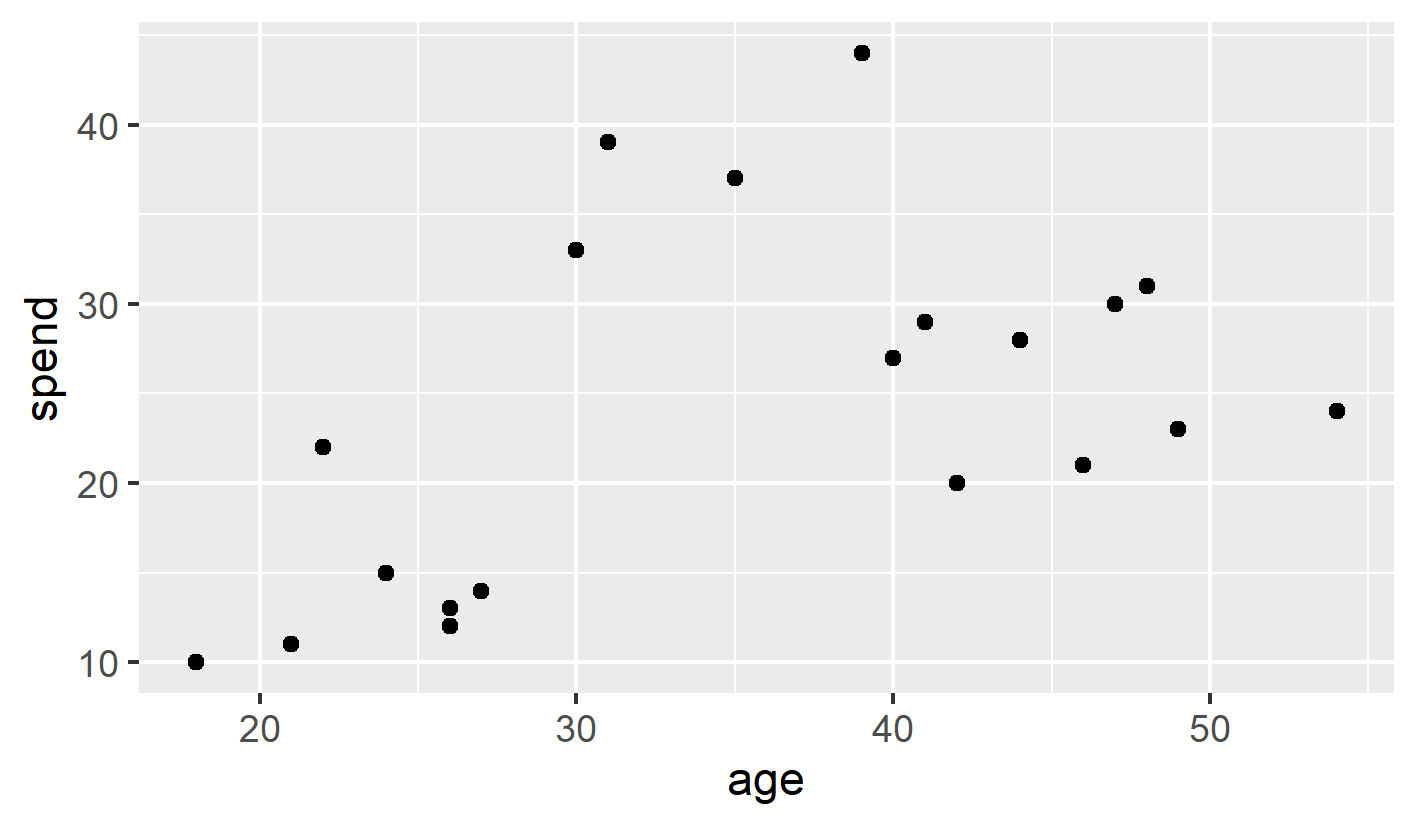
ggplot(df, aes(x=age, y=spend)) + geom_point() # scatter plot (단색) |
| 줄 107: | 줄 96: |
| {{attachment:grade_class.png}} | {{attachment:spending_bw.png||width=500px}} |
| 줄 111: | 줄 100: |
| fit <- kmeans(grade[,c(3,5)], 5) # grade의 3열 5열 두개를 이용하여 5개로 k-means clustering 하라 fit <- kmeans(cbind(grade$midterm, grade$attend), 5) # grade$midterm 와 grade$attend 를 두개의 컬럼으로 붙힌(cbind) 후, 5개로 k-means clustering 하라 str(fit) ggplot(grade, aes(midterm, attend, color = fit$cluster)) + geom_point() + xlim(0,100) + ylim(0,11) # grade의 midterm과 attend로 x,y plot을 찍되, 색은 fit$cluster 별로 다르게 해달라. |
fit <- kmeans(df, 3) # df를 3개로 k-means clustering 하라 str(fit) # 계산결과(fit) 내용 확인 # fit$cluster 에 k-means 군집 결과가 저장됨 ggplot(df, aes(x=age, y=spend, color=fit$cluster)) + geom_point() # 위 ggplot 문장과 똑같은데, color=옵션이 추가되었다. 색을 fit$cluster 별로 다르게 그려라~ |
| 줄 118: | 줄 107: |
| {{attachment:grade_kmeans_err.png}} | {{attachment:spending_color_error.png||width=500px}} |
| 줄 123: | 줄 112: |
| grade$cluster <- factor(fit$cluster) ggplot(grade, aes(midterm, attend, color = cluster)) + geom_point() + xlim(0,100) + ylim(0,12) |
df$cluster <- factor(fit$cluster) ggplot(df, aes(age, spend, color = cluster)) + geom_point() |
| 줄 126: | 줄 115: |
| ggsave('grade_kmeans.png', width=10, height=2.4) # 그림을 파일로 저장하라. w/h 단위는 inch | ggsave("spending_clustered.png", width=12, height=7, units='cm') # 그림을 파일로 저장하라. w/h 길이와 단위는 생략가능. 단위를 생략하면 inch로 간주 # RStudio의 Plots창의 Export 메뉴로도 저장할 수 있음 |
| 줄 128: | 줄 119: |
| {{attachment:grade_kmeans.png}} | {{attachment:spending_clustered.png||width=500px}} |
| 줄 130: | 줄 121: |
| === dbscan clustering === | === DBSCAN clustering === DBSCAN clustering은 dbscan 패키지로 실행할 수 있다. * dbscan library를 불러들인 후, dbscan 함수를 사용한다. * dbscan 함수의 인자로는 다음이 필요하다. * 2D 행렬 * eps: 같은 군집으로 묶일 최대 거리) * minPts: 같은 군집으로 묶일 최소 점의 갯수 |
| 줄 136: | 줄 134: |
| fit <- dbscan(grade[,c(3,5)], eps = 3.2, minPts = 2) str(fit) grade$cluster <- factor(fit$cluster) ggplot(grade, aes(midterm, attend, color = cluster)) + geom_point() + xlim(0,100) + ylim(0,12) |
fit <- dbscan(df, eps = 10, minPts = 3) }}} |
| 줄 141: | 줄 137: |
| ggsave('grade_dbscan.png', width=20, height=5, units = "cm") # w/h 단위는 cm | 실행하면 에러가 난다. * Error in dbscan(df, eps = 10, minPts = 3) : x has to be a numeric matrix. * 위 kmeans의 계산 결과로 df가 더 이상 2D 행렬이 아니게 됐기 때문이다. {{{#!highlight rout numbers=disable > head(df) age spend cluster 1 18 10 1 2 21 11 1 3 22 22 1 4 24 15 1 5 26 12 1 6 26 13 1 |
| 줄 143: | 줄 151: |
| {{attachment:grade_dbscan.png}} * cluster 0은 outlier다. |
해결방법: 다음과 같이 df의 1,2열만 사용한다고 명시한다. {{{#!highlight r fit <- dbscan(df[,c(1,2)], eps = 10, minPts = 3) df$cluster <- factor(fit$cluster) ggplot(df, aes(age, spend, color = cluster)) + geom_point() ggsave('spending_dbscan.png', width=12, height=7, units = "cm") # w/h 단위는 cm }}} {{attachment:spending_dbscan_eps_10.png||width=500px}} * 최대거리 10 이하를 한 군집으로 묶어준 경우 2개의 군집이 된다. eps 옵션을 줄여보자. {{{#!highlight r fit <- dbscan(df[,c(1,2)], eps = 8, minPts = 3) df$cluster <- factor(fit$cluster) ggplot(df, aes(age, spend, color = cluster)) + geom_point() ggsave('spending_dbscan.png', width=12, height=7, units = "cm") # w/h 단위는 cm }}} {{attachment:spending_dbscan_eps_8.png||width=500px}} * cluster 0은 outlier다. (어느 점과도 eps 거리 안에 속하지 못 함) ----- {{{ 과제: MASS Library의 Pima.te 데이터를 이용하여 age vs. bmi 그래프를 그리고, 이를 5개의 군집으로 나눠서 색칠하세요. 코드 시작: library(MASS) data(Pima.te) df <- Pima.te[,c(7,5)] }}} |
Clustering
Classification vs. Clustering
분류 |
Learning 기법 |
요약 |
Classification |
Supervised |
기분류된 데이타로 회귀 모델을 만들어 분류 |
Clustering |
Un-supervised |
데이타 모양(거리)로 unbiased 분류 시도 |
Classification
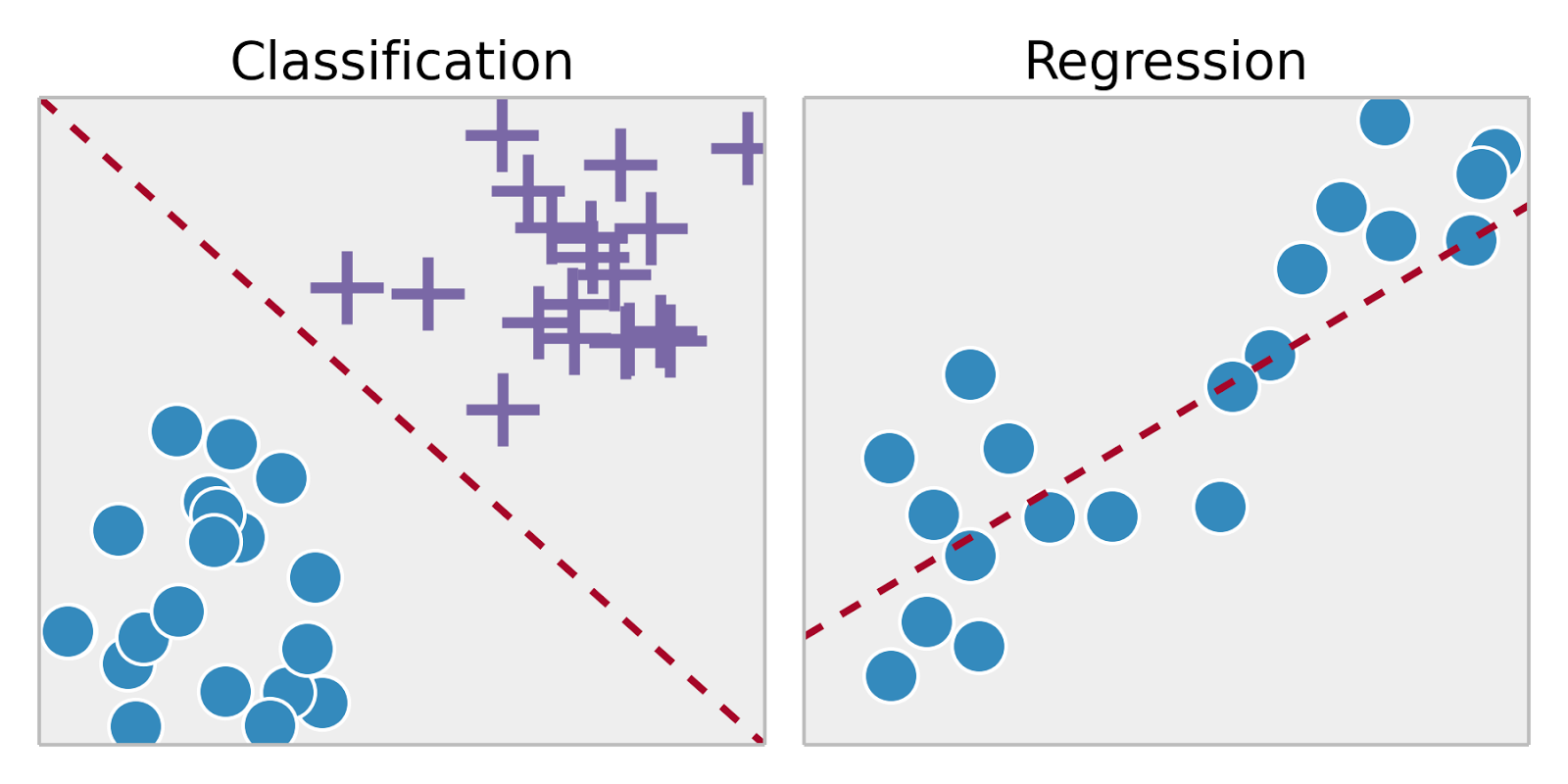
- Linear Regression을 응용한 logistic regression, naive bayes, support vector machines, artificial neural networks, random forests 등을 이용
- 기존 데이타(training dataset)으로 학습한 후 그 regression 함수로 새로운 데이타(test dataset)을 분류
Clustering

- training dataset이 없거나 구하기가 어려운 경우, 데이타 자체로 분류
- 한줄 요약: 거리가 가까운 데이터끼리 같은 그룹으로 분류한다.
거리 = sqrt(x12 + x22 + x32 + ... + xn2)
k-means Clustering

- 데이타를 k개로 분류하고자 한다면
- k개의 random point를 정하고 시작한다.
- 모든 데이타 점을 조사하여 k개의 point중 어느 것과 제일 가까운지 결정하여, 첫번째 분류를 완료한다.
- k개의 첫번째 분류에서 각 분류의 평균점을 구한다. 이 평균점을 새로운 k개의 point로 간주하고 위 과정을 반복한다.
- 더 이상 분류가 바뀌지 않으면 분류를 종료한다.
> str(fit)
List of 9
 $ cluster     : int [1:n] 5 2 1 5 4 5 5 3 1 1 ... (k개의 cluster)
 $ centers     : num [1:5, 1:2] 51.5 20.4 79.7 65.2 39.8 ... (각 cluster center의 x,y 좌표)
  ..- attr(*, "dimnames")=List of 2
  .. ..$ : chr [1:5] "1" "2" "3" "4" ...
  .. ..$ : NULL
 $ totss       : num 21631
 $ withinss    : num [1:5] 51.6 429.1 221.6 174.7 209.9
 $ tot.withinss: num 1087
 $ betweenss   : num 20544
 $ size        : int [1:5] 11 7 12 12 16
 $ iter        : int 2
 $ ifault      : int 0
Density-Based Spatial Clustering and Application with Noise (DBSCAN)
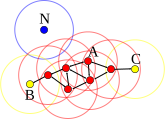
- 같은 그룹으로 묶고 싶은 최대 거리 ε과 같은 그룹을 형성할 수 있는 점의 최소 갯수 minPts를 정한다.
- 어떤 점 p의 거리 ε사이에 minPts개의 점이 있으면 일단 한 그룹을 만든다.
- 그 그룹의 모든 점의 ε 거리에 다른 점이 있으면 역시 같은 그룹으로 묶는다. (친구의 친구는 친구)
- 더 이상 확장이 안 될때까지 확장한다.
- 계산이 끝난 후에 아무 그룹에도 속하지 않은 점은 outlier(아싸) 처리한다.
> str(fit)
List of 3
 $ cluster: int [1:n] 1 2 3 1 3 1 1 3 3 3 ... (적절한 수의 cluster)
 $ eps    : num 우리가 입력한 값 저장됨 (참고용)
 $ minPts : num 우리가 입력한 값 저장됨 (참고용)
 - attr(*, "class")= chr [1:2] "dbscan_fast" "dbscan"
R 실습
data 읽어오기
ggplot2
R 기본 그래픽 함수 대신 편리한 ggplot2를 사용해보자.
형식: ggplot(data, aes(x=x_data, y=y_data, color=z_data)) + 다양한그림함수()
k-means clustering

- fit$cluster가 숫자 데이타로 인식되어 continuous coloring이 되어 버렸다.
- 이 값을 분류(factor) 데이타로 바꾼후 재시도하자.
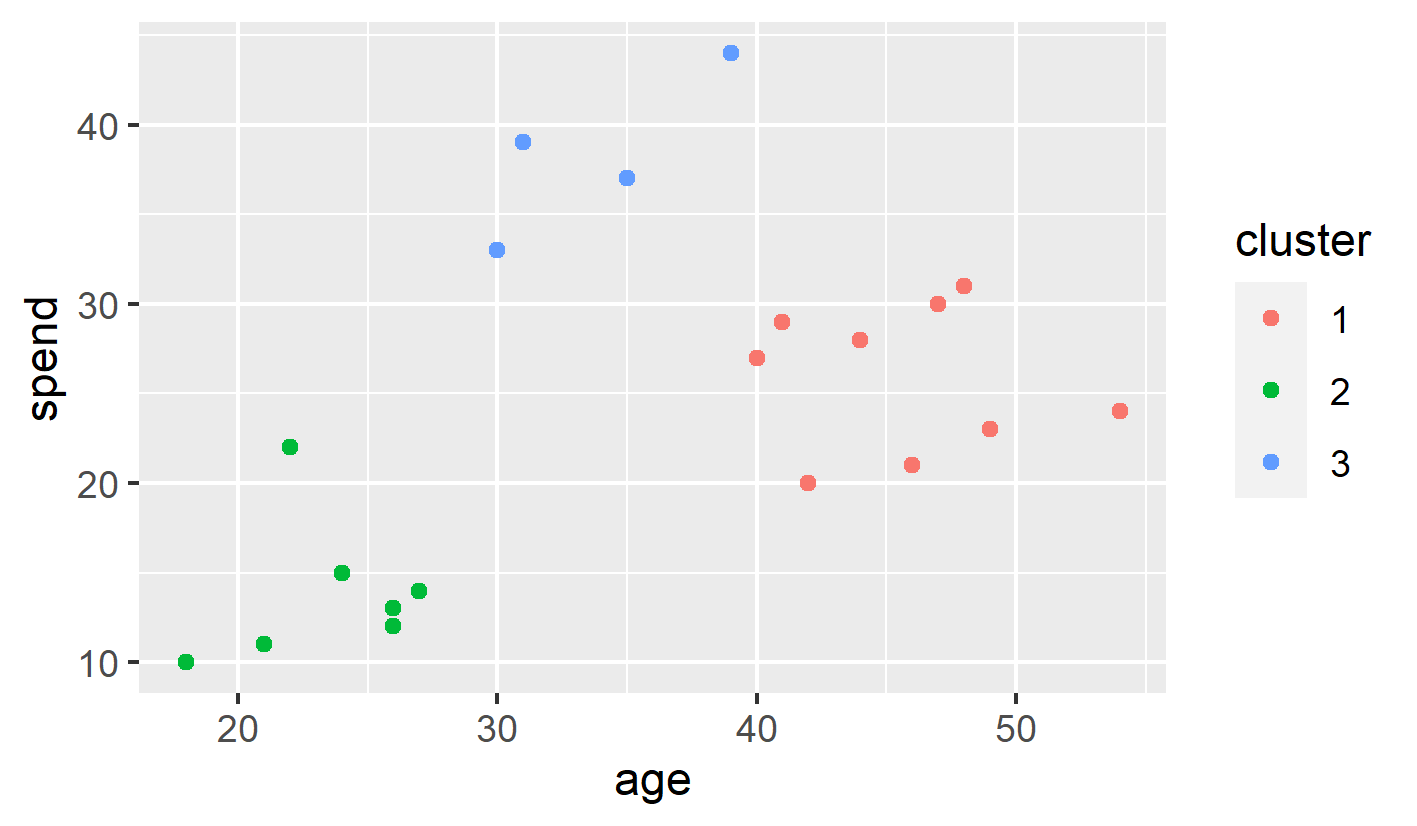
DBSCAN clustering
DBSCAN clustering은 dbscan 패키지로 실행할 수 있다.
- dbscan library를 불러들인 후, dbscan 함수를 사용한다.
- dbscan 함수의 인자로는 다음이 필요하다.
- 2D 행렬
- eps: 같은 군집으로 묶일 최대 거리)
- minPts: 같은 군집으로 묶일 최소 점의 갯수
실행하면 에러가 난다.
- Error in dbscan(df, eps = 10, minPts = 3) : x has to be a numeric matrix.
- 위 kmeans의 계산 결과로 df가 더 이상 2D 행렬이 아니게 됐기 때문이다.
> head(df)
  age spend cluster
1  18    10       1
2  21    11       1
3  22    22       1
4  24    15       1
5  26    12       1
6  26    13       1
해결방법: 다음과 같이 df의 1,2열만 사용한다고 명시한다.
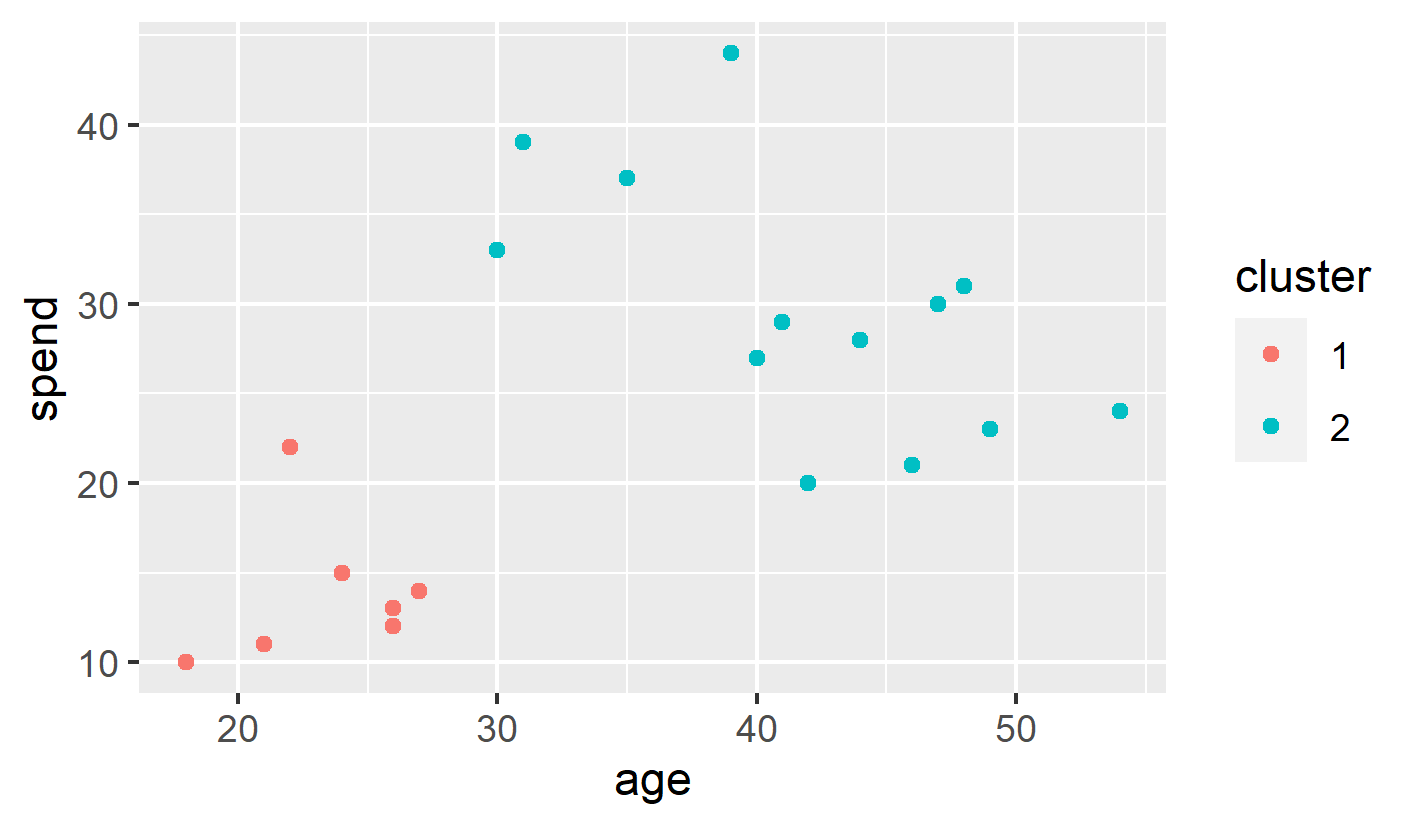
- 최대거리 10 이하를 한 군집으로 묶어준 경우 2개의 군집이 된다.
eps 옵션을 줄여보자.
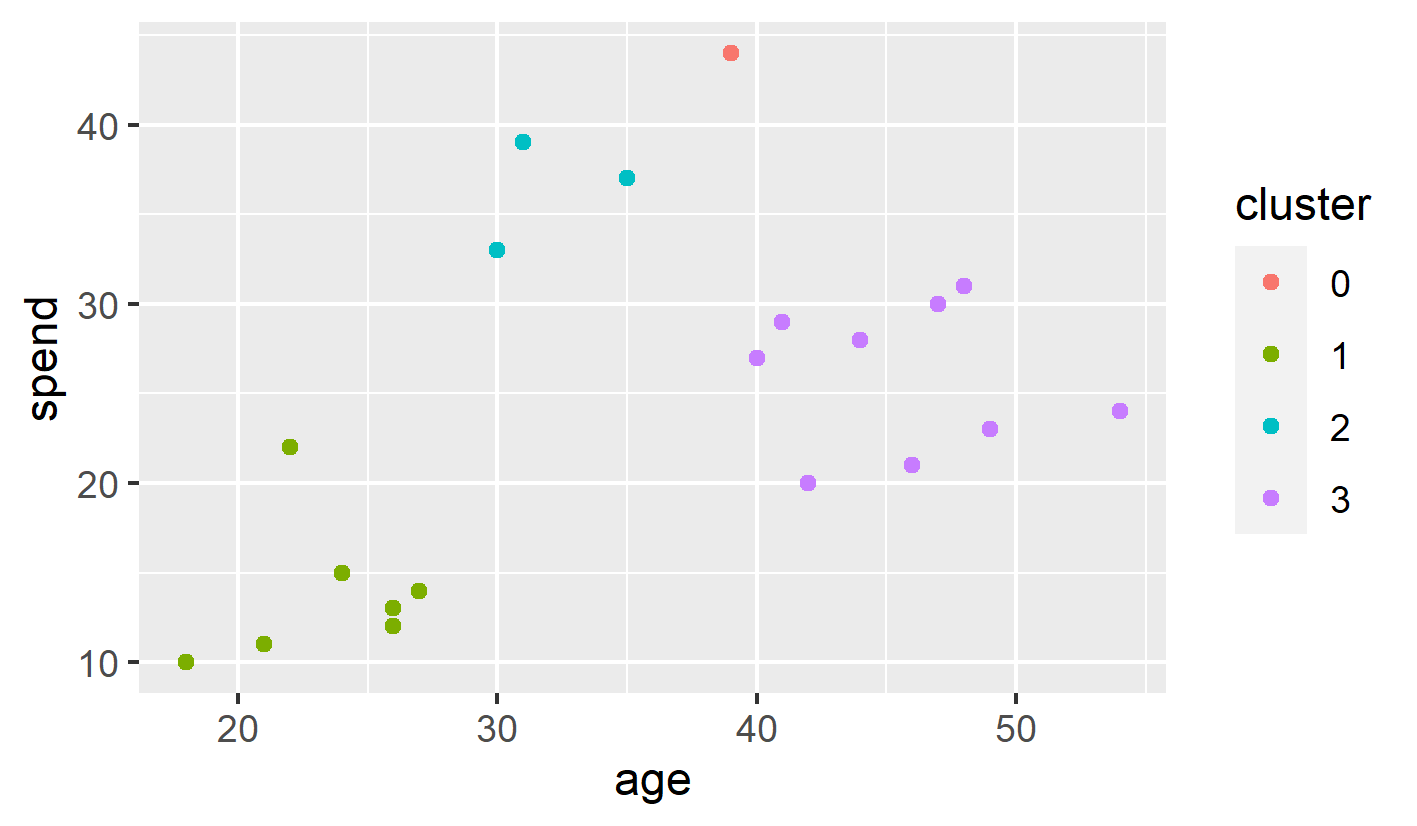
- cluster 0은 outlier다. (어느 점과도 eps 거리 안에 속하지 못 함)
과제: MASS Library의 Pima.te 데이터를 이용하여 age vs. bmi 그래프를 그리고, 이를 5개의 군집으로 나눠서 색칠하세요.
코드 시작:
library(MASS)
data(Pima.te)
df <- Pima.te[,c(7,5)]
| /CentralLimitTheorem /ChiSquared /Clustering /InstallR /InstallRStudio /Lies /NormalDistribution /RBasic /RBasic1 /RBasic2 /RBasic3 /RCloud /RIntro /RKorean /T-Test |