Home ChungLab Wiki
    • 설명
    • 못 고치는 문서
    • Menu
      • Navigation
      • RecentChanges
      • FindPage
      • 사이트맵
      • Help
      • HelpContents
      • HelpOnMoinWikiSyntax
      • 보기
      • 첨부
      • 정보
      • 원문 보기
      • 인쇄용 화면
      • 수정
      • 로드
      • 저장
    • 로그인

    Navigation

    • FindPage
    • HelpContents
    • FunReading

    Upload page content

    You can upload content for the page named below. If you change the page name, you can also upload content for another page. If the page name is empty, we derive the page name from the file name.

    File to load page content from
    Page name
    설명

    • Class
    • Statistics
    • Clustering

    Clustering

    Classification vs. Clustering

    분류

    Learning 기법

    요약

    Classification

    Supervised

    기분류된 데이타로 회귀 모델을 만들어 분류

    Clustering

    Un-supervised

    데이타 모양(거리)로 unbiased 분류 시도

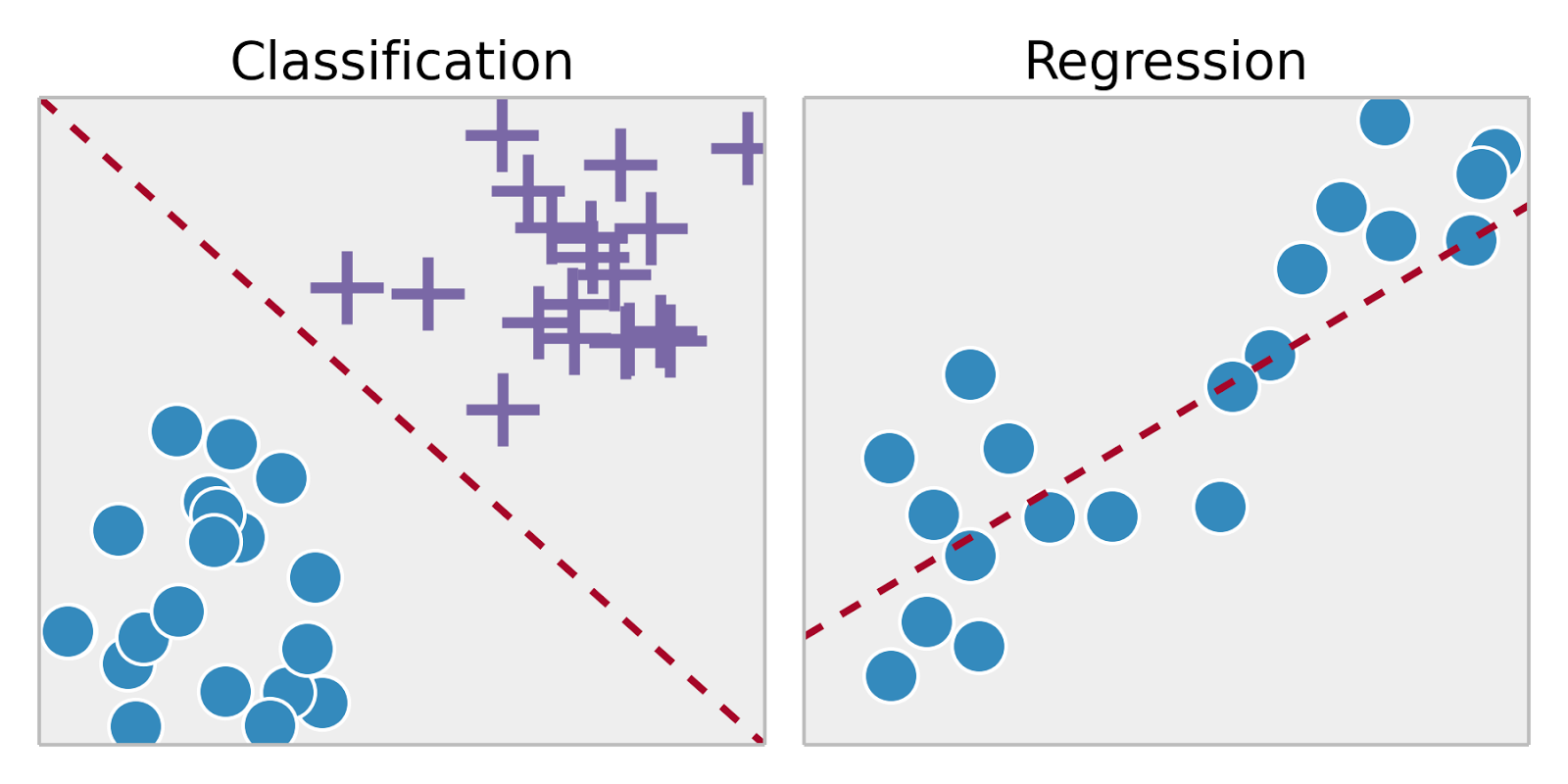
    Classification

    https://cdn-images-1.medium.com/max/2000/1*ASYpFfDh7XnreU-ygqXonw.png

    • Linear Regression을 응용한 logistic regression, naive bayes, support vector machines, artificial neural networks, random forests 등을 이용
    • 기존 데이타(training dataset)으로 학습한 후 그 regression 함수로 새로운 데이타(test dataset)을 분류

    Clustering

    https://upload.wikimedia.org/wikipedia/commons/1/16/Swiss_kmeans.svg

    • training dataset이 없거나 구하기가 어려운 경우, 데이타 자체로 분류
    • 한줄 요약: 거리가 가까운 데이터끼리 같은 그룹으로 분류한다.
      • 거리 = sqrt(x12 + x22 + x32 + ... + xn2)

    k-means Clustering

    https://upload.wikimedia.org/wikipedia/commons/e/ea/K-means_convergence.gif

    1. 데이타를 k개로 분류하고자 한다면
    2. k개의 random point를 정하고 시작한다.
    3. 모든 데이타 점을 조사하여 k개의 point중 어느 것과 제일 가까운지 결정하여, 첫번째 분류를 완료한다.
    4. k개의 첫번째 분류에서 각 분류의 평균점을 구한다. 이 평균점을 새로운 k개의 point로 간주하고 위 과정을 반복한다.
    5. 더 이상 분류가 바뀌지 않으면 분류를 종료한다.

       1 fit <- kmeans(n차원 행렬, k)
       2 str(fit)
    

    > str(fit)
    List of 9
     $ cluster     : int [1:n] 5 2 1 5 4 5 5 3 1 1 ... (k개의 cluster)
     $ centers     : num [1:5, 1:2] 51.5 20.4 79.7 65.2 39.8 ... (각 cluster center의 x,y 좌표)
      ..- attr(*, "dimnames")=List of 2
      .. ..$ : chr [1:5] "1" "2" "3" "4" ...
      .. ..$ : NULL
     $ totss       : num 21631
     $ withinss    : num [1:5] 51.6 429.1 221.6 174.7 209.9
     $ tot.withinss: num 1087
     $ betweenss   : num 20544
     $ size        : int [1:5] 11 7 12 12 16
     $ iter        : int 2
     $ ifault      : int 0


    Density-Based Spatial Clustering and Application with Noise (DBSCAN)
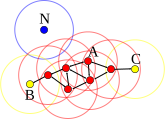
    https://upload.wikimedia.org/wikipedia/commons/a/af/DBSCAN-Illustration.svg

    1. 같은 그룹으로 묶고 싶은 최대 거리 ε과 같은 그룹을 형성할 수 있는 점의 최소 갯수 minPts를 정한다.
    2. 어떤 점 p의 거리 ε사이에 minPts개의 점이 있으면 일단 한 그룹을 만든다.
    3. 그 그룹의 모든 점의 ε 거리에 다른 점이 있으면 역시 같은 그룹으로 묶는다. (친구의 친구는 친구)
    4. 더 이상 확장이 안 될때까지 확장한다.
    5. 계산이 끝난 후에 아무 그룹에도 속하지 않은 점은 outlier(아싸) 처리한다.

       1 library("dbscan")
       2 
       3 fit <- dbscan(n차원 행렬, eps = 최대거리, minPts = 최소점갯수)
       4 str(fit)
    

    > str(fit)
    List of 3
     $ cluster: int [1:n] 1 2 3 1 3 1 1 3 3 3 ... (적절한 수의 cluster)
     $ eps    : num 우리가 입력한 값 저장됨 (참고용)
     $ minPts : num 우리가 입력한 값 저장됨 (참고용)
     - attr(*, "class")= chr [1:2] "dbscan_fast" "dbscan"


    R 실습

    data 읽어오기

       1 dataFile <- "https://raw.githubusercontent.com/gehoon/statistics/master/data/spending.csv"
       2 df <- read.csv(url(dataFile))
       3 str(df)
       4 head(df)
       5 plot(df)
    

    ggplot2

    R 기본 그래픽 함수 대신 편리한 ggplot2를 사용해보자.

    • 형식: ggplot(data, aes(x=x_data, y=y_data, color=z_data)) + 다양한그림함수()
    • 참고: https://ggplot2.tidyverse.org/

       1 # 설치가 안 되어 있다면 다음을 실행하여 설치(최초 1회)
       2 # install.packages('ggplot2')
       3 library(ggplot2)
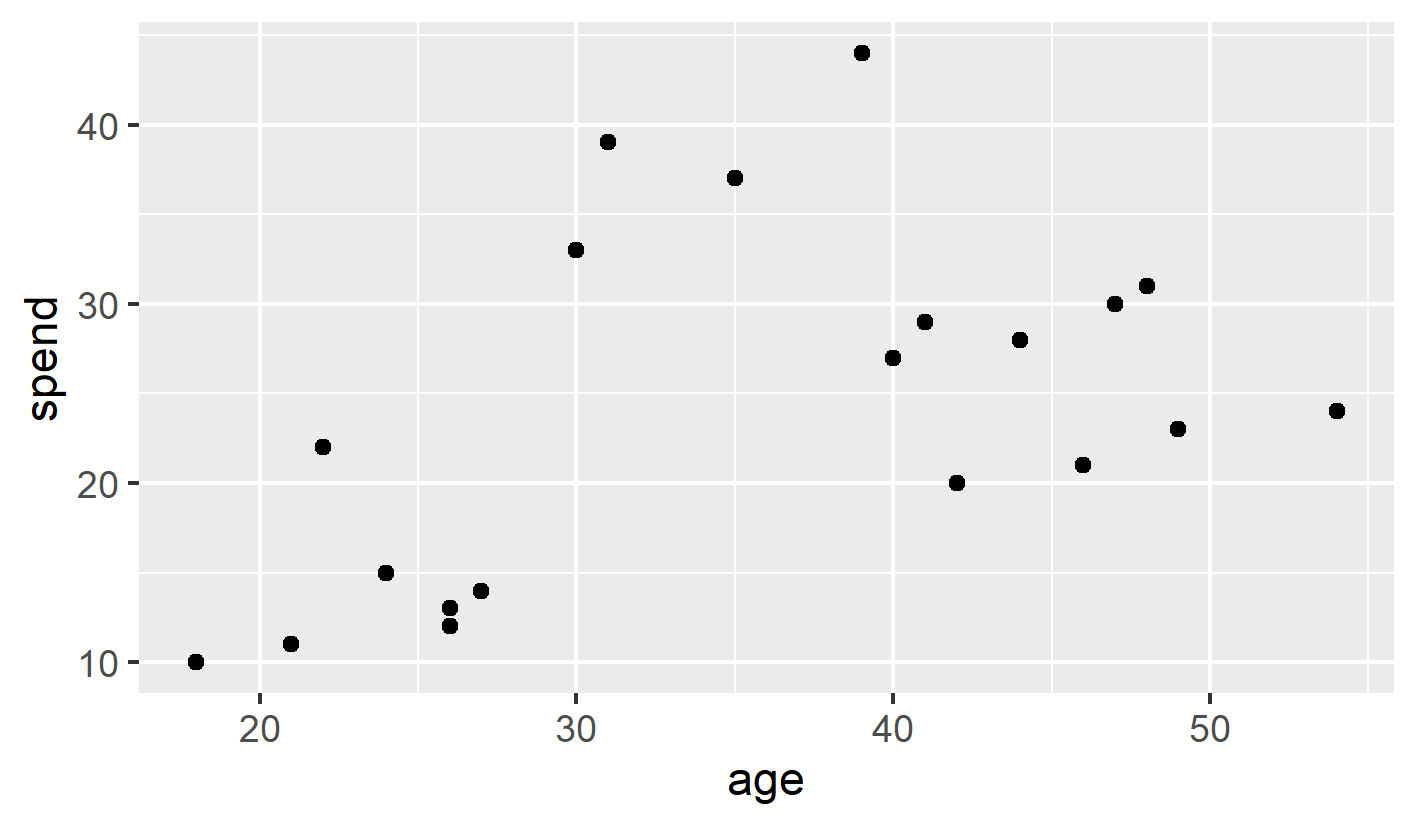
       4 ggplot(df, aes(x=age, y=spend)) + geom_point() # scatter plot (단색)
    

    spending_bw.png

    k-means clustering

       1 fit <- kmeans(df, 3) # df를 3개로 k-means clustering 하라
       2 str(fit) # 계산결과(fit) 내용 확인
       3          # fit$cluster 에 k-means 군집 결과가 저장됨
       4 
       5 ggplot(df, aes(x=age, y=spend, color=fit$cluster)) + geom_point()
       6     # 위 ggplot 문장과 똑같은데, color=옵션이 추가되었다. 색을 fit$cluster 별로 다르게 그려라~
    

    spending_color_error.png

    • fit$cluster가 숫자 데이타로 인식되어 continuous coloring이 되어 버렸다.
    • 이 값을 분류(factor) 데이타로 바꾼후 재시도하자.

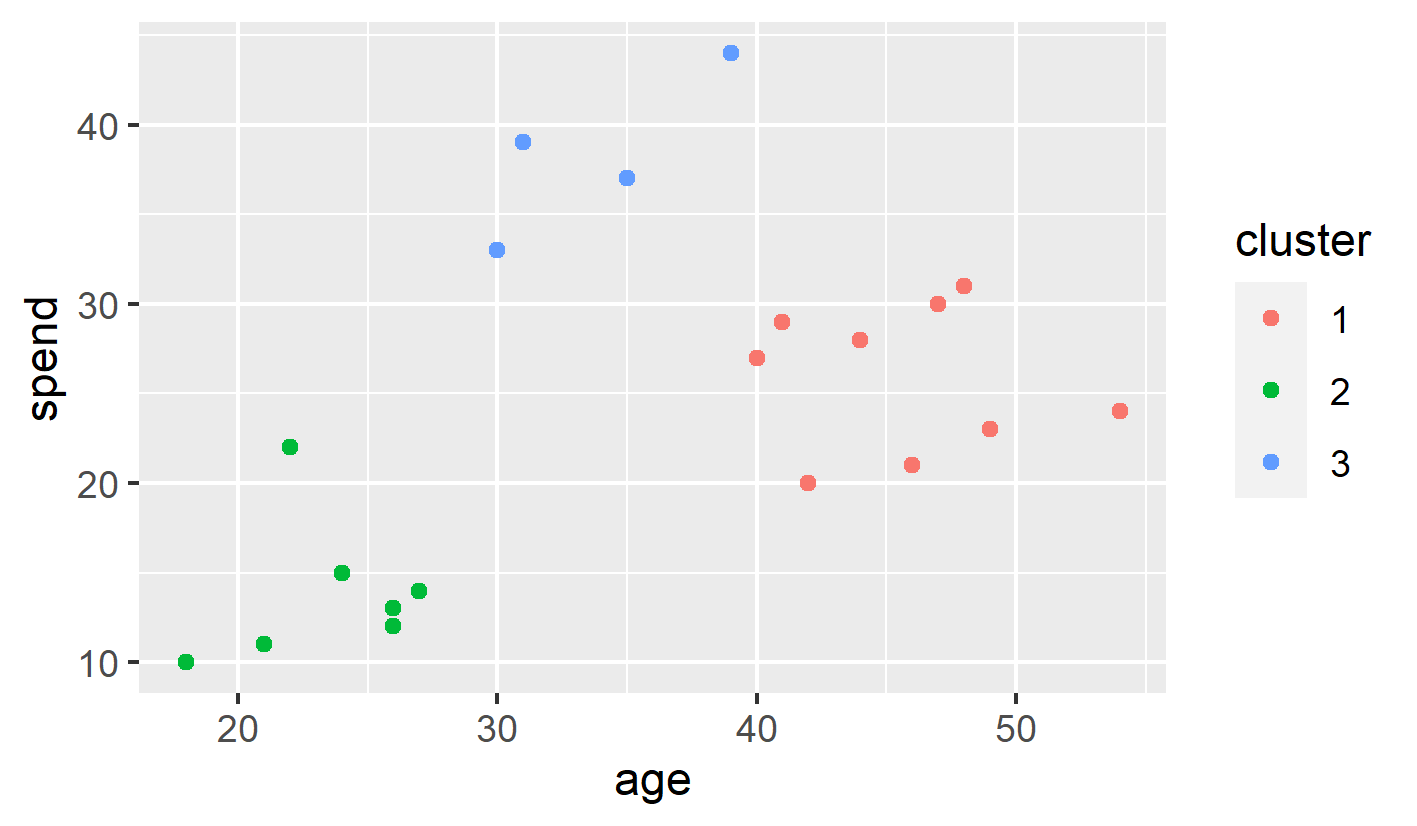
       1 df$cluster <- factor(fit$cluster)
       2 ggplot(df, aes(age, spend, color = cluster)) + geom_point()
       3 
       4 ggsave("spending_clustered.png", width=12, height=7, units='cm')
       5         # 그림을 파일로 저장하라. w/h 길이와 단위는 생략가능. 단위를 생략하면 inch로 간주
       6         # RStudio의 Plots창의 Export 메뉴로도 저장할 수 있음
    

    spending_clustered.png

    DBSCAN clustering

    DBSCAN clustering은 dbscan 패키지로 실행할 수 있다.

    • dbscan library를 불러들인 후, dbscan 함수를 사용한다.
    • dbscan 함수의 인자로는 다음이 필요하다.
      • 2D 행렬
      • eps: 같은 군집으로 묶일 최대 거리)
      • minPts: 같은 군집으로 묶일 최소 점의 갯수

       1 # 설치가 안 되어 있다면 한번만 실행
       2 # install.packages("dbscan")
       3 library("dbscan")
       4 
       5 fit <- dbscan(df, eps = 10, minPts = 3)
    

    실행하면 에러가 난다.

    • Error in dbscan(df, eps = 10, minPts = 3) : x has to be a numeric matrix.
    • 위 kmeans의 계산 결과로 df가 더 이상 2D 행렬이 아니게 됐기 때문이다.

    > head(df)
      age spend cluster
    1  18    10       1
    2  21    11       1
    3  22    22       1
    4  24    15       1
    5  26    12       1
    6  26    13       1


    해결방법: 다음과 같이 df의 1,2열만 사용한다고 명시한다.
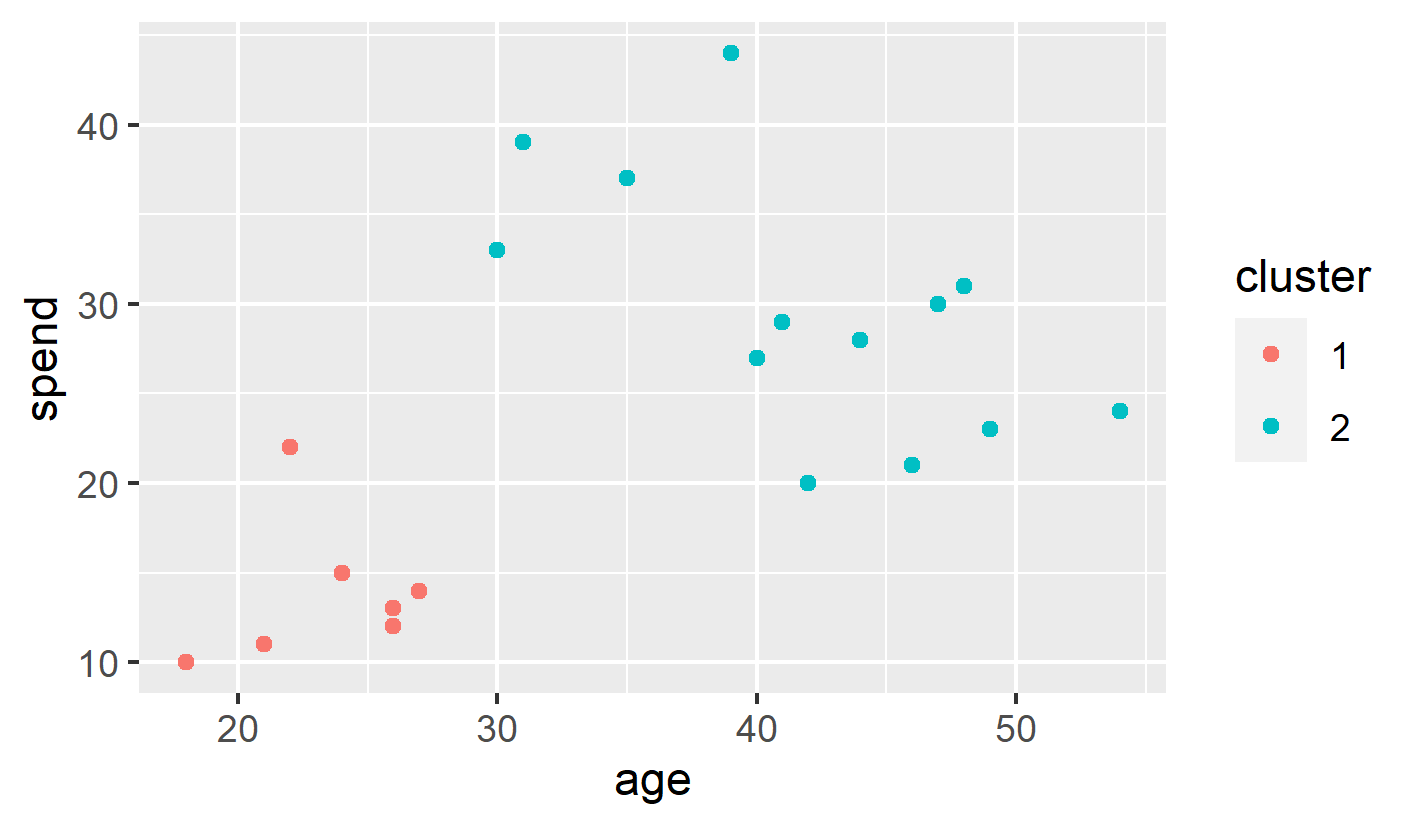
       1 fit <- dbscan(df[,c(1,2)], eps = 10, minPts = 3)
       2 df$cluster <- factor(fit$cluster)
       3 ggplot(df, aes(age, spend, color = cluster)) + geom_point()
       4 
       5 ggsave('spending_dbscan.png', width=12, height=7, units = "cm") # w/h 단위는 cm
    

    spending_dbscan_eps_10.png

    • 최대거리 10 이하를 한 군집으로 묶어준 경우 2개의 군집이 된다.

    eps 옵션을 줄여보자.
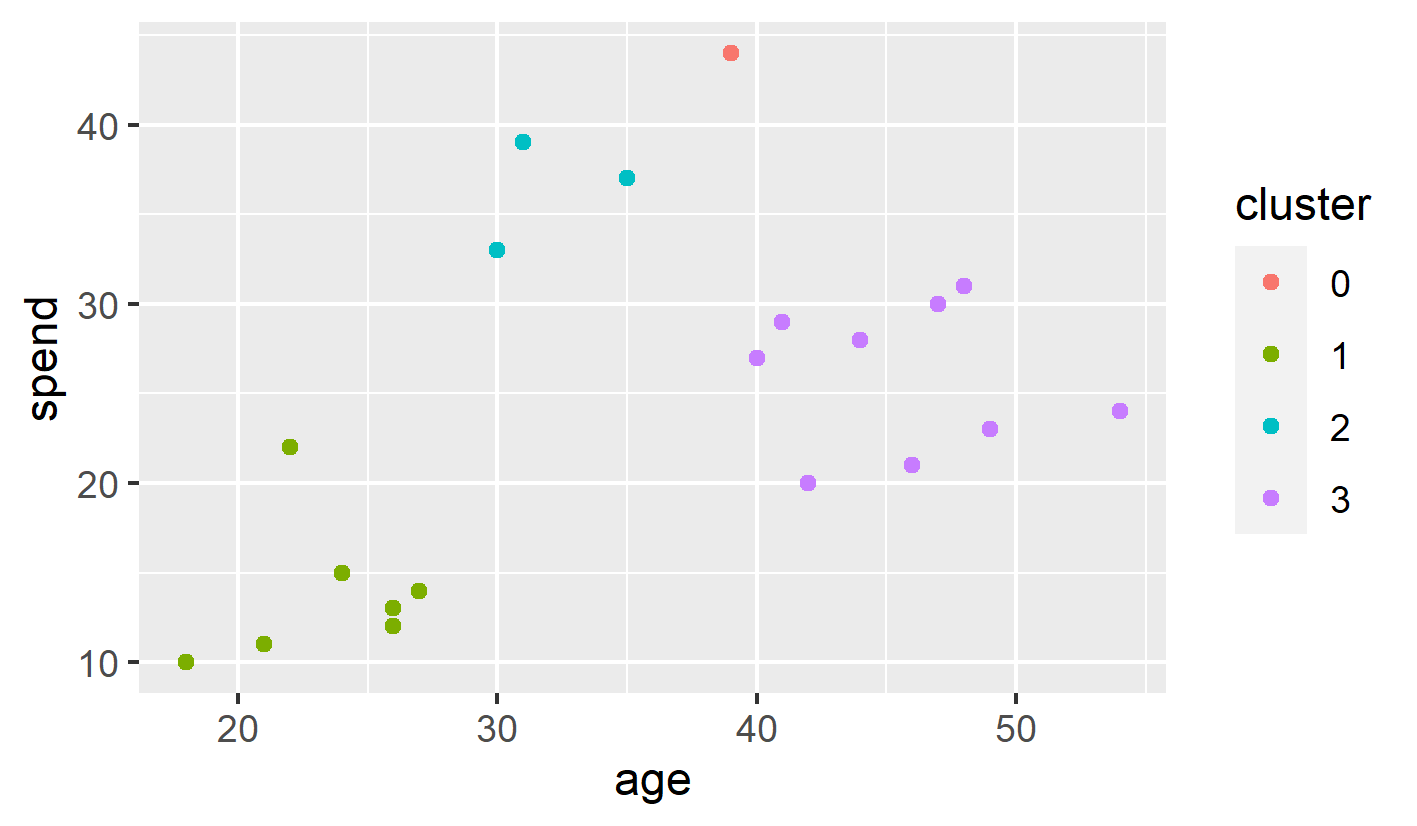
       1 fit <- dbscan(df[,c(1,2)], eps = 8, minPts = 3)
       2 df$cluster <- factor(fit$cluster)
       3 ggplot(df, aes(age, spend, color = cluster)) + geom_point()
       4 
       5 ggsave('spending_dbscan.png', width=12, height=7, units = "cm") # w/h 단위는 cm
    

    spending_dbscan_eps_8.png

    • cluster 0은 outlier다. (어느 점과도 eps 거리 안에 속하지 못 함)


    과제: MASS Library의 Pima.te 데이터를 이용하여 age vs. bmi 그래프를 그리고, 이를 5개의 군집으로 나눠서 색칠하세요.
    코드 시작:
    library(MASS)
    data(Pima.te)
    df <- Pima.te[,c(7,5)]


    /CentralLimitTheorem   /ChiSquared   /Clustering   /InstallR   /InstallRStudio   /Lies   /NormalDistribution   /RBasic   /RBasic1   /RBasic2   /RBasic3   /RCloud   /RIntro   /RKorean   /T-Test  
    Copyright © ChungLab. Built on MoinMoin and Bootstrap. All Rights Reserved.